Race-day control for cycling events · Now in beta
Run the whole race from one screen
The Race HQ puts every marshal, commissaire, convoy vehicle and medic on a live map, with push-to-talk voice and one-tap road messages, on the phones your crew already carry.
- Live positions
- Push-to-talk
- One-tap messages
- Full audit trail
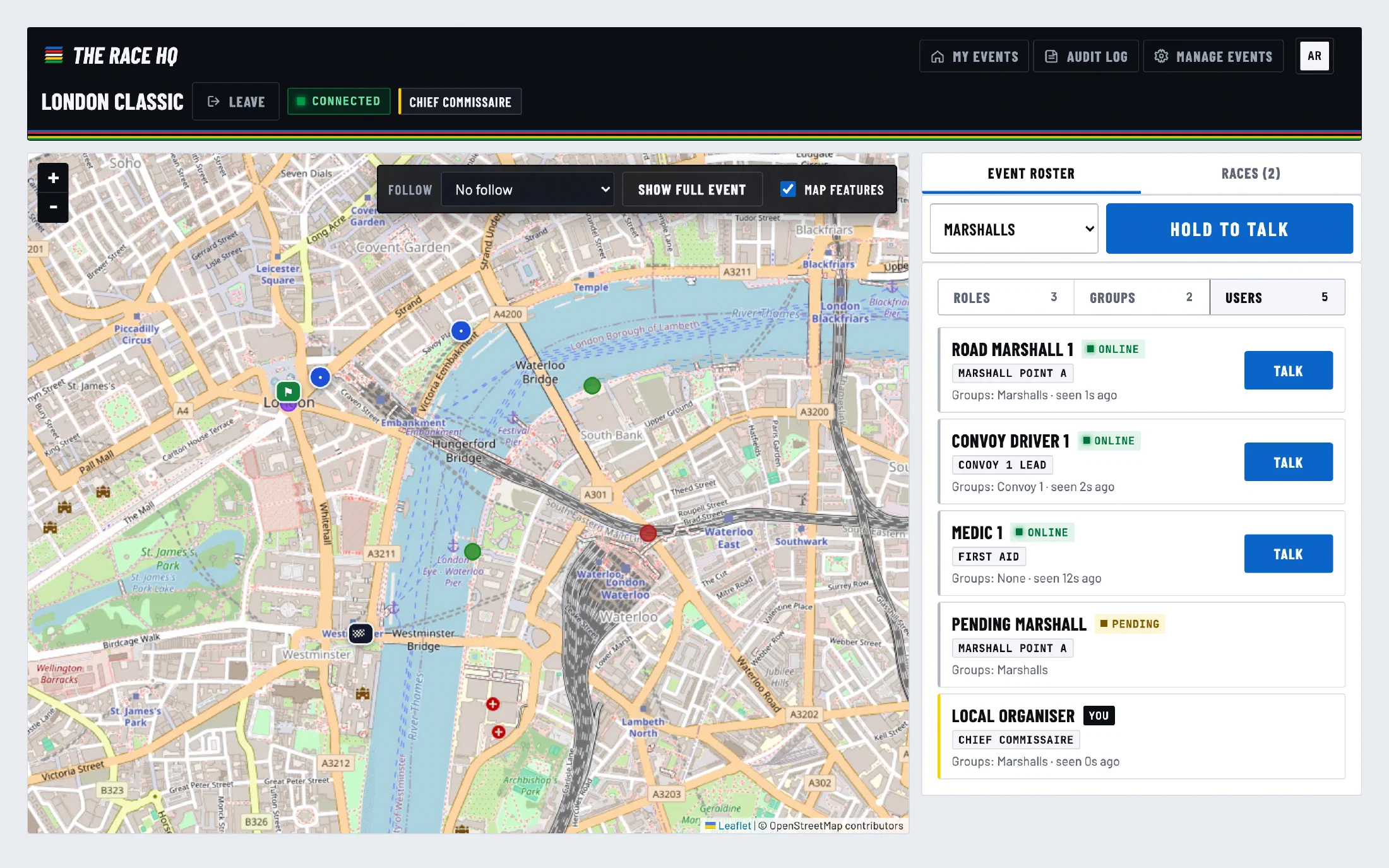
Features
Everything the control car needs
Built around how road races actually run: fixed marshal points, moving convoys, and a commissaire who needs to reach the right people now.
- 01
Live event map
Start, finish and every static marshal point on the map, with crew positions updating live. Tap a person, role or group in the roster to jump straight to them.
- 02
Follow the convoy
Lock the map onto a moving role or group, like the lead car or a motorbike marshal, and it stays centred as they travel the route.
- 03
Push-to-talk voice
Talk to one person, a whole role or a group. A ready tone tells you the channel is open, and receivers get a clear on-screen banner and a three-chirp alert.
- 04
One-tap road messages
Open Road, Close Road, Race Start. Each role and group carries its own shortcut messages, so the right call goes out with a single tap and stays on screen until it's dismissed.
- 05
Roles, groups and rosters
Set up static and mobile roles, organise them into groups, and invite crew by email. Everyone sees their own channels first, with clear online, offline and pending status.
- 06
Audit log and GPS history
Configuration changes and messages are recorded as they happen, and mobile roles keep a GPS trail with time and speed for post-race review.
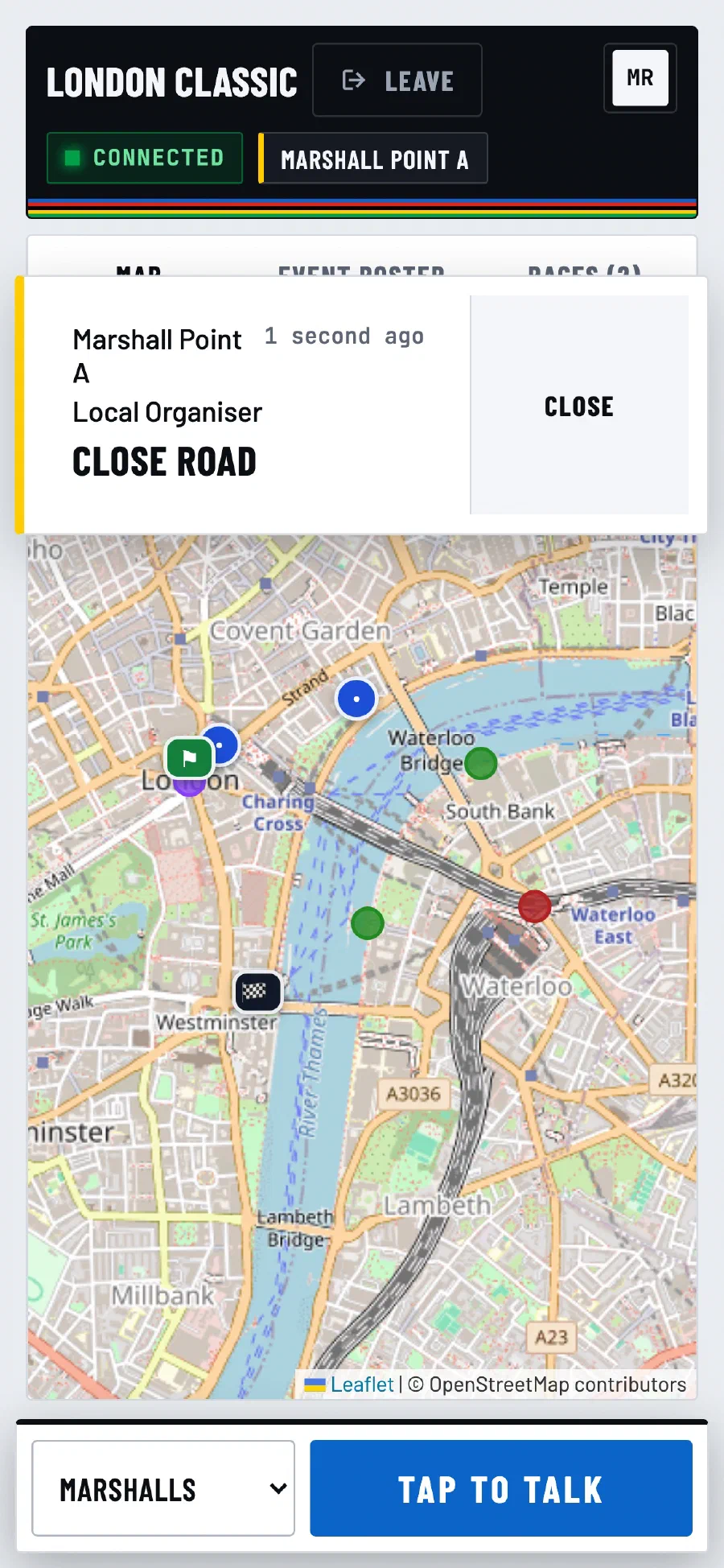
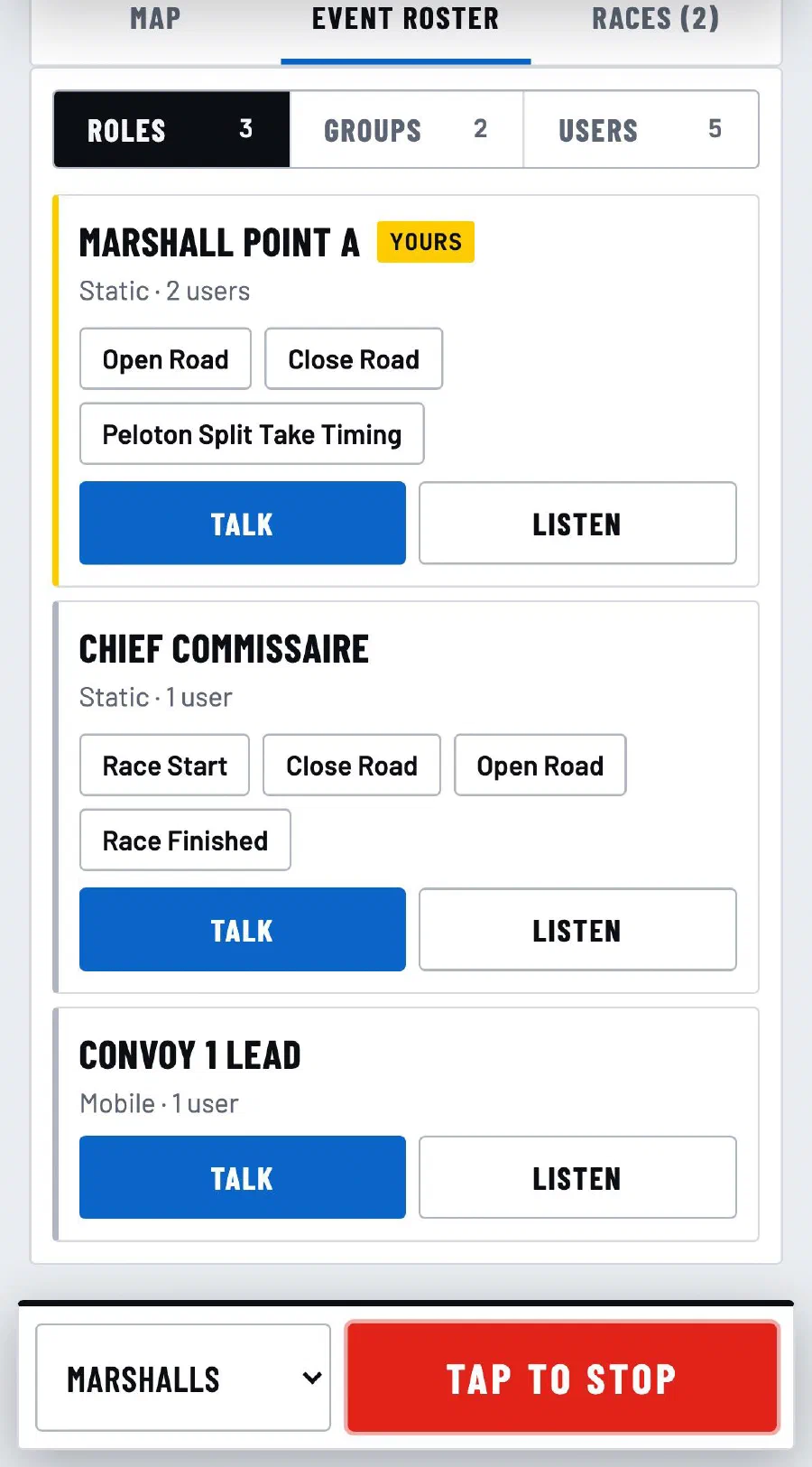
At the roadside
Made for the roadside
- Works in the phone browser your crew already has
- Large touch targets and high-contrast screens for bright sunshine
- Audible alerts for voice and messages, distinct from each other
- Messages stack and stay visible until dismissed
- Access by invitation only, with role-based permissions
Set-up to finish line
How it works
- 1
Set up the event
Place the start, finish and marshal points on the map, create roles and groups, and invite your crew. Save it as a template and next year's event is ready in minutes.
- 2
Crew join on their phones
Marshals open their invitation in a mobile browser, sign in and allow location and microphone. No app store download, and it can be added to the home screen.
- 3
Run the race
Everyone appears on the map. Talk, message and follow from a single screen at HQ, while marshals keep a big talk button in reach at the roadside.
Who it's for
Built for the whole crew
Organisers
Plan the course, roles and groups once, reuse them as templates, and see who has joined before the flag drops.
Commissaires
Reach any marshal point, group or convoy vehicle instantly, and keep a timestamped record of every call.
Marshals
Your own point and group first, a single talk button, and road messages you can't miss.
Convoy and first aid
Share your position automatically so control always knows where help is, and hear calls meant for you.
Pricing
Free during the beta
The Race HQ is in beta. We're looking for cycling events to run it with, and there's no charge while we do.
Beta test event
Beta£0 No charge during the beta
- Every feature: live map, push-to-talk, road messages and audit log
- Your whole crew, from race control to first aid
- No charge for test events while we're in beta
FAQ
Questions
How much does The Race HQ cost?
Nothing at the moment. The Race HQ is in beta and we're looking for cycling events to test it with, at no charge. Get in touch to offer an event.
What is The Race HQ?
A race control web app for cycling events. It shows every marshal, convoy vehicle and medic on a live map and lets race control reach them with push-to-talk voice and one-tap road messages.
Do marshals need to install an app?
No. Crew open their invitation in the browser on their phone and sign in. It can be added to the home screen for quicker access, but nothing needs installing from an app store.
What does a marshal's phone need?
A modern mobile browser with a data connection. When they join an event, crew are asked to allow location, so race control can see them, and microphone, so they can use push-to-talk.
Who is it for?
Event organisers who plan the course and crew, commissaires running the race, road marshals at fixed points, and convoy vehicles and first aid on the move.
How does push-to-talk work?
Choose a person, a role or a group and hold the talk button (or tap it on a phone). A ready tone tells you the channel is open, and the people you're talking to see a banner and hear a three-chirp alert.
What are shortcut messages?
Short, preset road messages such as Open Road, Close Road and Race Start. Each role and group has its own set, sent with one tap. They arrive with a double-beep and stay on screen until dismissed.
Can we reuse an event set-up next year?
Yes. Save an event as a template with its roles, groups, races, shortcut messages and start and finish positions, then create the next event from it.
Is there a record of what happened on the day?
Yes. Configuration changes and shortcut messages are kept in an event audit log, and mobile roles keep a GPS history with time, position and speed. Organisers and commissaires can review it.
Who can join an event?
Only people invited by the organiser. Each person's role decides what they can see and do.